Most chatbots can talk. Few can do anything. The difference doesn’t show in a demo. It shows at 2 a.m., when a tenant sends a voice note and a blurry photo of a dripping ceiling.
This article walks through one such conversation, step by step, so you can see what a bot needs in order to close a real problem rather than answer it nicely. The example comes from the world our platform was born in: Build-App’s AI agent for building-management companies (Hebrew). The details in the example are synthetic.
Key points
- A useful bot understands voice notes and photos, not only text.
- It takes actions in the business’s system through defined tools, and every action is logged.
- It knows when to stop and hand off to a person, with everything said so far.
- A-Point’s platform does this in production, with tens of thousands of real conversations.
One conversation, step by step
02:07 · A voice note and a photo
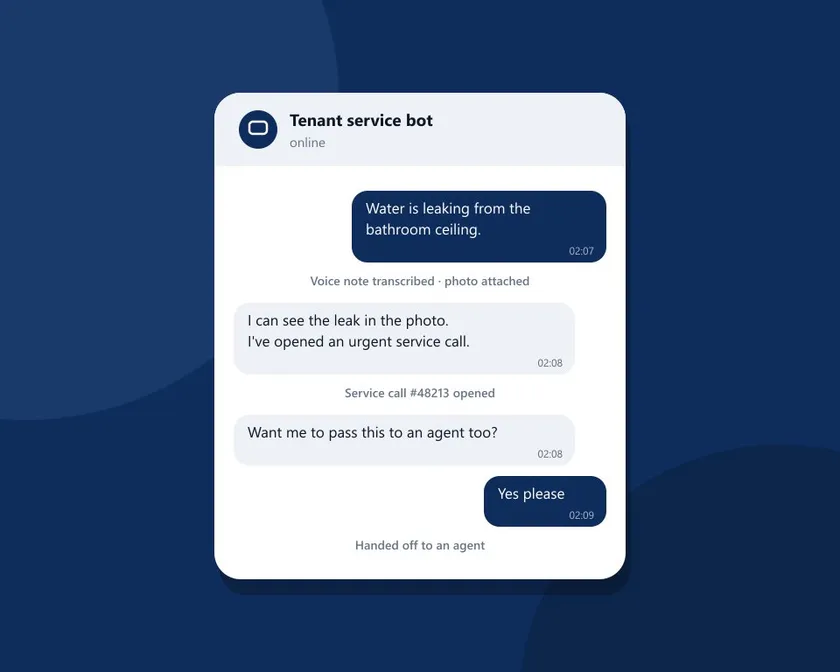
The tenant doesn’t type. They record 14 seconds: “There’s water leaking from the bathroom ceiling, it’s dripping on the floor.” Then they send a photo.
The platform transcribes the voice note and analyzes the photo, so the bot receives clear text and a description of what the image shows. Without this step the bot would reply “Sorry, could you type that?”, and a tenant with water on the floor won’t.
02:08 · Recognize, then act
The bot recognizes the tenant by phone number and knows their building and apartment. Now it has to do something, not just respond.
Every bot on the platform has tools: defined actions it may perform in the business’s system. Here it uses the tool that opens a service call, attaches the photo and the transcript, and marks the call urgent. The bot decides when to use each tool, but it can’t perform an action we didn’t define for it. Credentials for the system are stored encrypted, and every tool call is logged.
The tenant gets a short reply: “I can see the leak in the photo. I’ve opened an urgent service call and notified the maintenance team.”
02:08 · Offer a person
A leak at night isn’t a bot-only matter. The bot asks whether to pass the conversation to an agent as well. The tenant says “Yes please”.
02:09 · Handoff with full context
The conversation goes to an agent with everything said, the call that was opened and the photo. The agent doesn’t ask “what’s the problem?” again. Handoffs can also wait for business hours, while the bot keeps the tenant updated.
The next day · Follow-up
If the tenant doesn’t respond to an update, the platform sends a scheduled reminder, within WhatsApp’s 24-hour window rules. Messages left unanswered are detected and caught up, so no request falls through the cracks.
What’s behind the conversation
For that conversation to work every time, a few parts work together:
- Channels: a direct connection to Meta’s Cloud API for WhatsApp Business, and a chat widget embedded on your site. Each number and site is assigned its own bot.
- Knowledge: documents, procedures and FAQs the bot searches by meaning, to answer questions like “when is cleaning day?”.
- Models: each bot runs on an AI model chosen for it (Claude, Gemini, OpenAI or Azure OpenAI), by quality, speed and cost.
- Control: an admin view of every conversation with the tools used, a scenario engine that replays test conversations before a change so a prompt fix doesn’t break what worked, and visible cost per bot and per conversation.
The full list is on the chatbot platform page.
Proven in the field: Build-App
We built the platform first for our own product, Build-App. On WhatsApp, its agent answers tenants around the clock, opens and updates service calls, answers balance and payment questions, and passes the conversation to the management team when a person is needed. Build-App describes it on its AI agent page and in an article on how management companies use it (both in Hebrew).
To date the platform has handled tens of thousands of real conversations. What that means for you: the first-day-in-production problems are already solved. Duplicate messages, a tenant who sends five short messages in a row, a voice note with no text, a photo of a leak at 2 a.m. We’ve seen it, and we built for it.
Your bot, on the same platform
The example is building management, but the mechanism is general: a conversation, understanding, an action in a system, and a handoff to a person when needed. We build custom chatbots for businesses in any field. We handle discovery, build, connection, testing and support.
We also connect the bot to the systems you already run: ERP and CRM, SQL Server, legacy Microsoft Access systems, APIs and n8n flows. You don’t need to replace a system to get a smart bot. As a software house working since 2011, that is exactly our work.
Want to see how it would look for you? See the chatbot platform, or tell us what your customers ask.